1
I am not sure how to do this using XoopsForm classes.
- I have a form (see pic) with two checkbox elements: Fruit Selection and Ripeness.
- Each checkbox element has multiple options (red/blue/medium ..etc.)
- I was able to create a checkbox to select all only for the entire form using xoopsCheckAll but with the checkbox placed outside of the form (prefer having it inline). I tried using xoopsCheckAllElements and xoopsCheckGroup but could not get it to work.
Does anyone have a simple solution how to turn the "Select All" checkboxes below into functioning "Select All" checkboxes using XoopsForm classes. I would like to be able to select all just for "Fruit Color" or just for "Ripeness".
Thanks !!!!!!!!!!!!!!!!!
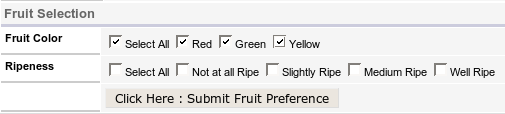
sample code :
$form = new XoopsThemeForm('Fruit Selection', 'fruitform', 'fruit.php', 'post', true);

$checkbox_color = new XoopsFormCheckBox('Fruit Color', 'checkbox_color', none);
$checkbox_color->addOption('all','Select All');
$checkbox_color->addOption('red', "Red");
$checkbox_color->addOption('green', "Green");
$checkbox_color->addOption('yellow', "Yellow");
$form->addElement($checkbox_color);

$checkbox_ripeness = new XoopsFormCheckBox('Ripeness', 'checkbox_ripeness', none);
$checkbox_ripeness->addOption('all', "Select All");
$checkbox_ripeness->addOption('notatall', "Not at all Ripe");
$checkbox_ripeness->addOption('slightly', "Slightly Ripe");
$checkbox_ripeness->addOption('medium', "Medium Ripe");
$checkbox_ripeness->addOption('well', "Well Ripe");
$form->addElement($checkbox_ripeness);

$button = new XoopsFormElementTray('' ,'submitb');
$button->addElement(new XoopsFormButton('', 'post_fruit_id', "Click Here : Submit Fruit Preference", 'submit'));
$form->addElement($button);

$form->display();


