

| Re: Icon for new pm in the main navbar, not only on the dropdown "User Menu" list |
| by alain01 on 2020/1/4 13:47:08 to preserve space on the navbar, i changed the code : le="color: #000000"><?php <{xoInboxCount assign="unread_count" total='inbox_total'}> <li class="nav-item"> <a class="nav-link" href="<{$xoops_url}>/viewpmsg.php"> <{if $unread_count}> <span class="mx-auto xoopsweb-color fas fa-envelope fa-lg"></span> <span class="badge badge-pill badge-danger align-text-top"><{$unread_count}></span> <{else}> <span class="mx-auto xoopsweb-color fas fa-envelope-open fa-lg"></span> <span class="badge badge-pill badge-secondary align-text-top"><{$inbox_total-$unread_count}></span> <{/if}> </a> </li>
|
| Re: Icon for new pm in the main navbar, not only on the dropdown "User Menu" list |
| by alain01 on 2019/12/13 14:47:16 yes, and yet write in another topic, for me : 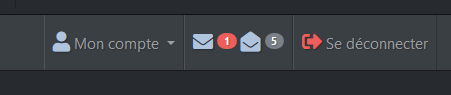 Boostrap 4 le="color: #000000"><?php <{xoInboxCount assign="unread_count" total='inbox_total'}> <li class="nav-item"> <a class="nav-link" href="<{$xoops_url}>/viewpmsg.php"> <{if $unread_count}> <span style="font-size: 20px;" class="mx-auto xoopsinactive-color fas fa-envelope"></span> <span class="badge badge-pill badge-danger align-text-top"><{$unread_count}></span> <{/if}> <span style="font-size: 20px;" class="mx-auto xoopsinactive-color fas fa-envelope-open"></span> <span class="badge badge-pill badge-secondary align-text-top"><{$inbox_total-$unread_count}></span> </a> </li>
|
| Re: Icon for new pm in the main navbar, not only on the dropdown "User Menu" list |
| by goffy on 2019/12/13 14:14:48 Hi yes, I am the same opinion. I have implemented this in myxoops.org and in the skiclub theme but I have no access to theme of xoops.org code is le="color: #000000"><?php <a data-toggle="dropdown" class="dropdown-toggle" href="javascript:;"><{$smarty.const.THEME_ACCOUNT}><{xoInboxCount assign="unreadCount"}> <{if $unreadCount > 0}><span class="badge"><{$unreadCount}></span><{/if}><b class="caret"></b></a>
|
| Icon for new pm in the main navbar, not only on the dropdown "User Menu" list |
| by alain01 on 2019/12/13 12:10:02 Hi, i had a PM im my inbox, but i missed them more than 1 week cause i dont clic often on the "User Menu", so i cant see the "inbox" line with badge. I can see this badge "(number of unread PM") only if i click on the "User Menu" link. It will be very usefull to add this badge too close the user Menu, not only on the "inbox" line. Like that : "User Menu (2) v" |
Search
Recent Posts
Who's Online
Donat-O-Meter
| Stats | |
| Goal: | $15.00 |
| Due Date: | Jul 31 |
| Gross Amount: | $0.00 |
| Net Balance: | $0.00 |
| Left to go: | $15.00 |

|
|