

| Re: Publisher 1.0 Final ready for testing |
| by Mamba on 2014/10/2 23:21:01 @ mjoel, I've redesigned the Archive as you requested, and have added also the count of articles in each month and in year, so it looks like this: 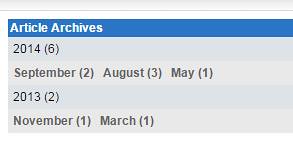 I will be included in the next version. |
| Re: Publisher 1.0 Final ready for testing |
| by Bleekk on 2014/5/21 12:48:47 Yes I also think that this design is better then a endless list. Is on the list to change in publisher thanks |
| Re: Publisher 1.0 Final ready for testing |
| by mjoel on 2014/5/21 12:01:44 lol i try the arhive redesign code from the topic https://xoops.org/modules/newbb/viewtopic.php?post_id=163853 le="color: #000000"><?php <table> <tr> <th><{$lang_newsarchives}></th> </tr> <{foreach item=year from=$years}> <tr class="even"> <td><{$year.number}></td> </tr> <tr class="odd"> <td> <{foreach item=month from=$year.months}> <a href="./archive.php?year=<{$year.number}>&month=<{$month.number}>"><{$month.string}> </a> <{/foreach}> </td> </tr> <{/foreach}> </table> and it also work in publisher.. hope this can be put in publisher... |
| Re: Publisher 1.0 Final ready for testing |
| by mjoel on 2014/5/21 11:54:11 i would like to request for redesign for the publisher archives section... i have article from 2009 until 2014..right now it lay-out a long list of months is it possible to arrange it by month by year ? something like Year 2014 Jan. Feb etc i have found a similar topic for the news module https://xoops.org/modules/newbb/viewtopic.php?post_id=163853 anyone can do a hack for publisher ? |
| Re: Publisher 1.0 Final ready for testing |
| by Mamba on 2014/5/20 11:55:58 Do the following: in modules\publisher\language\english\modinfo.php add: le="color: #000000"><?php define("_MI_PUBLISHER_DISPLAY_PDF","Display PDF Icon"); define("_MI_PUBLISHER_DISPLAY_PDF_DSC","Select Yes to show PDF icon and allow users to create PDF files"); in modules\publisher\xoops_version.php add around line 1011, after the the 'display_breadcrumb' part following: le="color: #000000"><?php ++$i; $modversion['config'][$i]['name'] = 'display_pdf'; $modversion['config'][$i]['title'] = '_MI_PUBLISHER_DISPLAY_PDF'; $modversion['config'][$i]['description'] = '_MI_PUBLISHER_DISPLAY_PDF_DSC'; $modversion['config'][$i]['formtype'] = 'yesno'; $modversion['config'][$i]['valuetype'] = 'int'; $modversion['config'][$i]['default'] = 1; In \modules\publisher\class\item.php around line 450 find and add the first line above the //PDF button, and and the closing bracket, so it looks like this: le="color: #000000"><?php if ($this->publisher->getConfig('display_pdf')) { // PDF button $adminLinks .= "<a href='" . PUBLISHER_URL . "/makepdf.php?itemid=" . $this->itemid() . "' rel='nofollow' target='_blank'><img src='" . PUBLISHER_URL . "/assets/images/links/pdf.gif' title='" . _CO_PUBLISHER_PDF . "' alt='" . _CO_PUBLISHER_PDF . "' /></a>"; $adminLinks .= " "; } You'll need to do the same in the \modules\publisher\blocks\latest_news.php file around line 198: le="color: #000000"><?php $item['pdf'] = ''; if ($this->publisher->getConfig('display_pdf')) { if ($options[25] == 1) { $item['pdf'] = "<a href='" . PUBLISHER_URL . "/makepdf.php?itemid=" . $itemObj->itemid() . "' rel='nofollow'><img src='" . PUBLISHER_URL . "/assets/images/links/pdf.gif' title='" . _CO_PUBLISHER_PDF . "' alt='" . _CO_PUBLISHER_PDF . "' /></a> "; } } Let us know if it works, and we'll add it to SVN. Bleekk, feel free to modify/change it as needed.
|
Search
Recent Posts
Who's Online
Donat-O-Meter
| Stats | |
| Goal: | $15.00 |
| Due Date: | Jul 31 |
| Gross Amount: | $0.00 |
| Net Balance: | $0.00 |
| Left to go: | $15.00 |

|
|