

| Re: jQuery script conflits? (Modern Blue theme vs jQuery Lof JSiderNews) |
| by Bleekk on 2010/9/2 10:38:55 maybe this can help you |
| Re: jQuery script conflits? (Modern Blue theme vs jQuery Lof JSiderNews) |
| by skyangelo on 2010/9/2 6:53:13 I just used a workaround: iframe.... I know it's not proper but at least it works. |
| Re: jQuery script conflits? (Modern Blue theme vs jQuery Lof JSiderNews) |
| by skyangelo on 2010/9/1 22:06:28 I'm using FF 3.6.8 and it's not displayed properly. I'm aware the background rectangle and I need to change it. Unfortunately, I don't have any javascript skill to change the xoops.js or any other javascript... Thanks anyway. 
|
| Re: jQuery script conflits? (Modern Blue theme vs jQuery Lof JSiderNews) |
| by ghia on 2010/9/1 19:27:49 The background rectangle should be a little bit larger. It looks like it can accomodate only 8 icons and not 9. Edit Oops wrong page (News). The defect is on the home page. Check the javascript code in xoops.js for onload. I guess you must then add a function for the document.ready and then alter the used scripts for proper chaining of this event. |
| jQuery script conflits? (Modern Blue theme vs jQuery Lof JSiderNews) |
| by skyangelo on 2010/8/29 18:25:50 I'm using Modern Blue them of TSBMusic. The horizontal navigation menu uses jQuery script and javascript with $(document).ready. le="color: #000000"><?php <script type="text/javascript"> $(document).ready( function() { $('#dock').Fisheye( { maxWidth: 10, items: 'a', itemsText: 'span', container: '.dock-container', itemWidth: 48, proximity: 20, halign : 'center' } ) } ); </script> I have a jQuery slideshow (Lof JsliderNews) block on my front page with another javascript with $(document).ready. le="color: #000000"><?php <script language="javascript" type="text/javascript" src="http://www.skyangelo.com/html/uploads/jQuery_SlideShow/js/jquery.js"></script> <script language="javascript" type="text/javascript" src="http://www.skyangelo.com/html/uploads/jQuery_SlideShow/js/jquery.easing.js"></script> <script language="javascript" type="text/javascript" src="http://www.skyangelo.com/html/uploads/jQuery_SlideShow/js/script.js"></script> <script type="text/javascript"> $(document).ready( function(){ var buttons = { previous:$('#lofslidecontent45 .lof-previous') , next:$('#lofslidecontent45 .lof-next') }; $obj = $('#lofslidecontent45').lofJSidernews( { interval : 6000, direction : 'opacitys', easing : 'easeInOutExpo', duration : 2000, auto : true, maxItemDisplay : 3, navPosition : 'horizontal', // horizontal navigatorHeight : 32, navigatorWidth : 80, mainWidth:750, isPreloaded: true, buttons : buttons} ); }); </script> It turns out that the navigation menu is not well displayed as all the icons are superposed one on each other. It look like this: 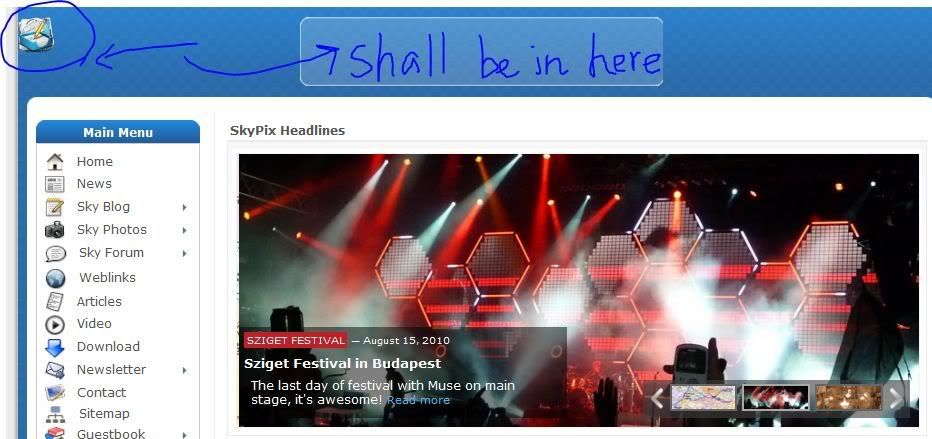 Can somebody help me as I have no javascript brain.... Thanks a lot. |
Search
Recent Posts
Who's Online
Donat-O-Meter
| Stats | |
| Goal: | $15.00 |
| Due Date: | Jul 31 |
| Gross Amount: | $0.00 |
| Net Balance: | $0.00 |
| Left to go: | $15.00 |

|
|